The Encounters Page
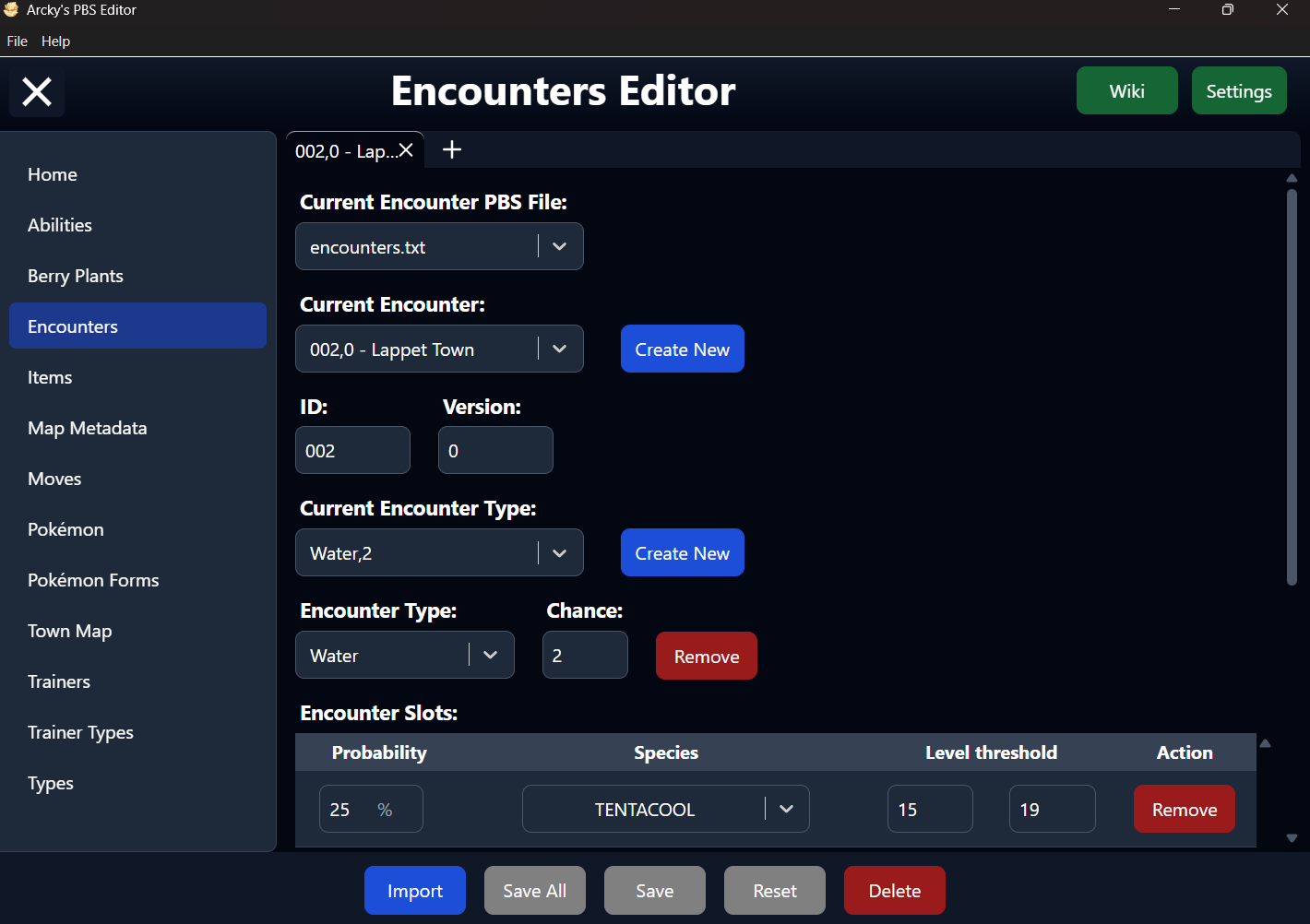
The Encounters Editor Page of the PBS Editor.
Table of Contents
Overview
The Encounters page is the dedicated editor within the PBS Editor for viewing and modifying all Encounter PBS data in your project. It provides a structured interface to inspect and edit every Encounter entry without needing to work directly with raw PBS files.
The structure the Encounter PBS uses differs from the other PBS types. The Editor provides a clear and consistent layout, making it easy understand and manage each Encounter Type and it's Encounter Slots at a glance. The Encounters Page does not support any fields introduced through plugins or custom extensions.
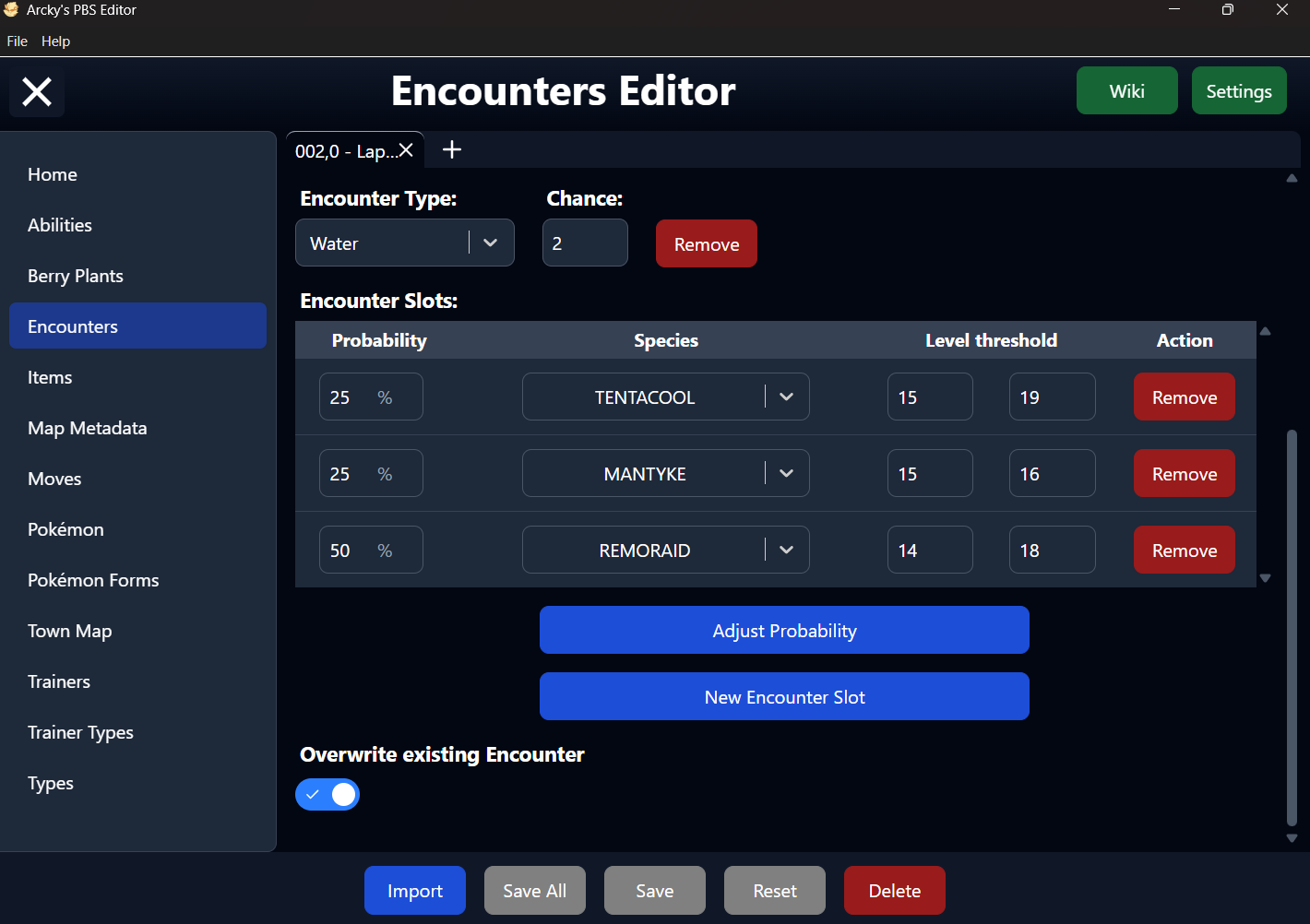
The screenshots below illustrate the general layout and structure of the Encounter editor. They serve as a visual guide to help you quickly locate sections and understand how information is originized within the interface.
Detailed explanations of individual parameters are provided in the sections that follow (Encounter Slots have their individual page). For deeper technical insight or engine-level behavior, refer to the official documentation: Defining an Encounter on the wiki.
Wiki
Settings
Import Encounters
Importing Encounters is not supported as mentioned above, the Encounters PBS uses a different structure and providing a TSV (Tab-Separated Values) file would be too complex and won't benifit anything.
Even though the button is not disabled, you'll still receive a message in the editor telling you importing Encounter Data is not supported.
Encounter File
This dropdown allows you to choose between all available Encounter PBS Files detected in your project.
The primary file is typically named encounters.txt, but the editor also supports additional files following the format encounters_xxx.txt.
The underscore (_) is required for these extra files to be recognized. Any text can follow it (e.g. encounters_custom.txt), but files without this naming pattern will not be detected as Encounter PBS files.
If only a single file is available, the dropdown will be automatically disabled, and that file will be selected by default.
Encounter Select
This dropdown lists all available Encounter entries for the currently selected file, identified by their ID.
In the PBS file, these IDs are defined using the format [xxx] or [xxx,y] (with y being the optional version number). For improved readability, the editor display them without brackets but with the matching Game Map Name from the map_metadata.txt file(s) in the interface.
Despite this visual simplification, the brackets are still required in the actual PBS structure. When saving, the editor will automatically restore the correct [xxx] or [xxx,y] (when a version is provided) format, even though it is not shown within the editor itself.
ID and Version
The ID servers as the internal identifier used by the engine to reference an Encounter. Each Encounter must have a unique ID to function correctly.
Unlike the Other PBS Types, Encounters can share the same ID by using an optional Version. This allows multiple Encounter entries to exist for the same Game Map while remaining uniquely identifable.
The ID is formatted as a 3-digit number (e.g. 002, 011). To help prevent errors, the editor will automatically pad the value with leading zeroes as you type.
Within the PBS file, the ID defines the start of a new Encounter entry and must always appear first in each block. This structure is handled automatically by the editor when saving, so no manual formatting is required.
As for the optional Version is a numeric value appended to the ID, separated by a comma (e.g. 005,1). It allows multiple variations for the same Game Map to coexist. As with the ID, all formatting is handled automatically by the editor.
Encounter Type Selection
This dropdown lists all the Encounter Types available within the currently selected Encounter.
Each subsection in an Encounter PBS entry begins with an Encounter Type. Some types a lso include an associated probability value, separated by a comma (e.g. Water,2).
Selecting an Encounter Type here allows you to view and edit the corresponding Encounter Table for that specific type.
Encounter Type and Chance
The available Encounter Types can be managed in the Encounter Settings section. From there, you can add custom Encounter Types so the editor can recognize and use them.
Some Encounter Types require an associated Chance value, defined as a number and separated by a comma in the PBS file (e.g. Water,2).
For "Land", "Cave", "Water", and "BugContest", this value represents the percentage chance of an Encounter occuring with each step.
For "RockSmash", it represents the percentage chance of triggering an encounter when breaking a rock.
Other default Encounter Types do not require a chance value, as their encounter rates are defined elsewhere in the game's scripts.
Encounter Slots
The Encounter Slots for each Encounter Type are displayed in a table format within the editor.
For detailed information, check the documentation here.
Other Parameters
There's no Other Fields on the Encounter Editor page.
Encounter Overwrite
This toggle determines how the editor handles saving the current Encounter entry.
- On — The editor will overwrite the existing Encounter entry that matches the current ID across the selected PBS file. This is the default mode.
- off — The editor will save the entry as a New Encounter entry, but only if the ID does not already exist in any loaded Encounter PBS file. If a matching ID is found anywhere, the entry cannot be saved.